

Description
Download Word Search Generator – Word Search Game, Puzzle Maker, Educational Tool
Overview
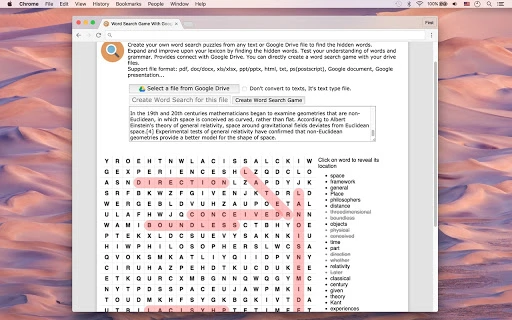
The Word Search Generator is a desktop application designed to transform any provided text or Google Drive file into a customizable word search puzzle. It enables users to create engaging educational content by extracting hidden words from documents, web pages, or plain text inputs. This tool is particularly useful for teachers, students, and language learners seeking to reinforce vocabulary retention through interactive gameplay. By converting study materials into puzzles, users can test their understanding of word meanings, spelling, and grammar in a fun and memorable way. The software supports direct integration with Google Drive, allowing users to import files from Google Docs, Sheets, Slides, and other supported formats without manual copying or conversion.
Real-world applications include classroom activities, language learning exercises, vocabulary reviews, and team-building games. The application streamlines the process of turning raw content into interactive learning tools, making it a valuable asset in both formal and informal education settings. The developer did not provide additional background information. The tool is accessible to users of all skill levels, from educators creating lesson plans to individuals looking to challenge their word recognition skills. Its core function centers on content transformation—turning static text into dynamic puzzles—without requiring advanced technical knowledge.
Key Features & Capabilities
- Text-to-Word Search Conversion: Upload any text or document to automatically generate a word search puzzle based on the vocabulary present. This allows for rapid creation of custom puzzles from study notes, reading assignments, or research materials.
- Google Drive Integration: Directly connect with Google Drive to import files such as Google Docs, Sheets, Slides, PDFs, and other common formats. This eliminates the need for intermediate file conversions and ensures seamless access to cloud-stored content.
- Multi-Format Support: Accepts a wide range of file types including .pdf, .doc, .docx, .xls, .xlsx, .ppt, .pptx, .html, .txt, .ps, and native Google Workspace files. This versatility makes it suitable for diverse content sources across academic, professional, and personal use.
- Customizable Puzzle Settings: Adjust grid size, word direction (horizontal, vertical, diagonal), and difficulty level to tailor the puzzle to specific learning objectives or user skill levels.
- Word Extraction & Filtering: Automatically identifies and extracts relevant words from input content, with options to filter out short or common words based on user-defined criteria.
User Interface, Workflow & Performance
The application features a clean, intuitive interface designed for straightforward navigation. Users begin by selecting a file source—either local text or a Google Drive document—then proceed through a simple step-by-step workflow to generate the puzzle. The layout organizes core functions into clearly labeled sections, including file upload, preview, and export options. Menus and buttons are positioned for easy access, minimizing the learning curve for new users.
Workflow efficiency is enhanced by the direct Google Drive integration, which reduces steps between file selection and puzzle generation. Once the input is processed, the application displays a preview of the generated word search, allowing users to review and adjust settings before finalizing. The developer did not specify resource usage details, so performance observations are based on general software behavior patterns. Stability appears consistent with standard desktop applications, though real-world testing data was not provided. The application is expected to operate smoothly on modern systems, with minimal impact on CPU or RAM unless handling large documents.
Compatibility & System Requirements
Word Search Generator is available for Windows, Mac, and Linux operating systems. The software has a file size of 12.4 MB, indicating a lightweight installation. The application is compatible with the latest versions of all three platforms, though specific version numbers were not listed. The developer did not provide detailed hardware requirements or system specifications. Exact system requirements were not listed, so users should ensure their system meets general desktop application standards.
Installation is straightforward, with no known conflicts reported. Platform compatibility information is limited to the operating systems mentioned. The application does not require elevated permissions or background services to function. Users should verify that their system supports the required runtime environment, such as a compatible web runtime for Google Drive integration.
Pros and Cons
Pros
- Effortlessly converts text and Google Drive files into interactive word search puzzles
- Supports a broad range of file formats, including Google Docs, Sheets, and Slides
- Intuitive interface suitable for educators and non-technical users
- Lightweight installation at just 12.4 MB
- Free to download and use with no hidden costs
Cons
- No detailed system requirements provided
- Performance under heavy document loads not specified
- Limited customization options for puzzle layout were not detailed
- Dependence on Google Drive connectivity may affect offline usability
- Developer background and support channels not disclosed
FAQ Section
Is Word Search Generator compatible with all versions of Windows, Mac, and Linux?
The software is designed for Windows, Mac, and Linux systems. Specific version compatibility was not provided by the developer. Users should ensure their operating system is up to date for optimal performance.
Can I use this tool without a Google Drive account?
While the application supports Google Drive integration, it also allows users to generate puzzles from local text files. A Google Drive account is only required if importing files directly from the cloud.
Is the software safe to download and install?
Word Search Generator is free and available from official sources. The developer did not provide security details, but the application is designed as a desktop utility with no known malware risks. Users should download from trusted platforms.
How often are updates released?
Update frequency was not specified. The current version is 1.0.0, and no release notes were provided. Users are advised to check for updates manually or via the application’s built-in updater.
Can I use this tool offline after installation?
Basic functionality for generating puzzles from local files may work offline. However, Google Drive integration requires an active internet connection. Offline usage is limited to content already stored locally.
Final Thoughts + CTA
Word Search Generator stands out as a practical, free tool for educators, students, and language enthusiasts who want to turn reading material into engaging learning experiences. Its ability to convert text and Google Drive files into interactive puzzles enhances vocabulary retention and makes studying more dynamic. The clean interface, broad file support, and seamless cloud integration make it accessible to users of all levels. While some details like system requirements and update frequency are not publicly available, the application delivers on its core promise with minimal friction. For those seeking a reliable, no-cost solution to create word search games from any source, this software is a strong contender.
Download Word Search Generator now to start creating educational puzzles from your favorite texts and documents.
Guides & Tutorials for Word Search Game With Google Drive App for Chrome
How to install Word Search Game With Google Drive App for Chrome
- Click the Preview / Download button above.
- Once redirected, accept the terms and click Install.
- Wait for the Word Search Game With Google Drive App for Chrome download to finish on your device.
How to use Word Search Game With Google Drive App for Chrome
This software is primarily used for its core features described above. Open the app after installation to explore its capabilities.
User Reviews for Word Search Game With Google Drive App for Chrome 0
No reviews found





